


| Updated On - Jun 17, 2026
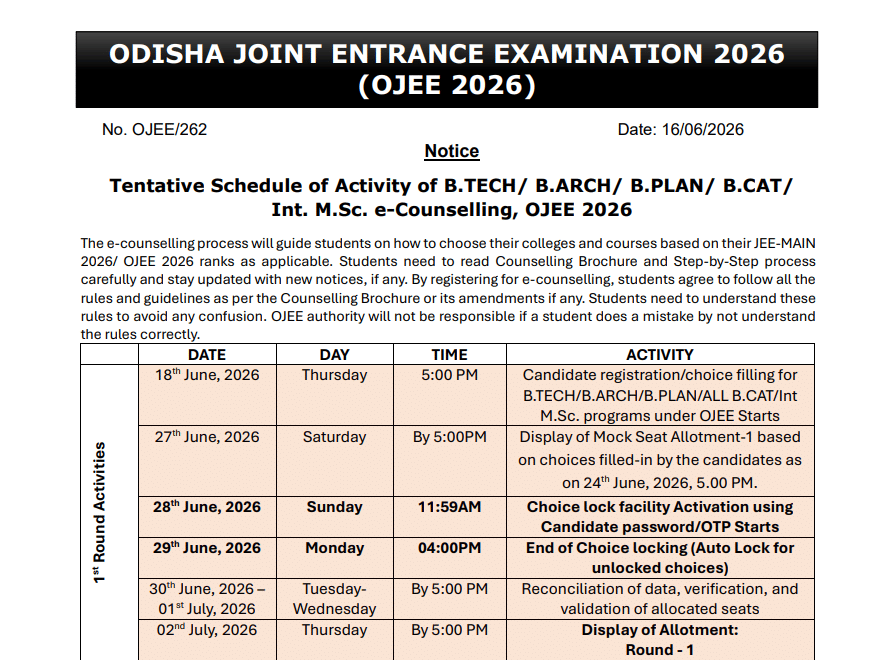
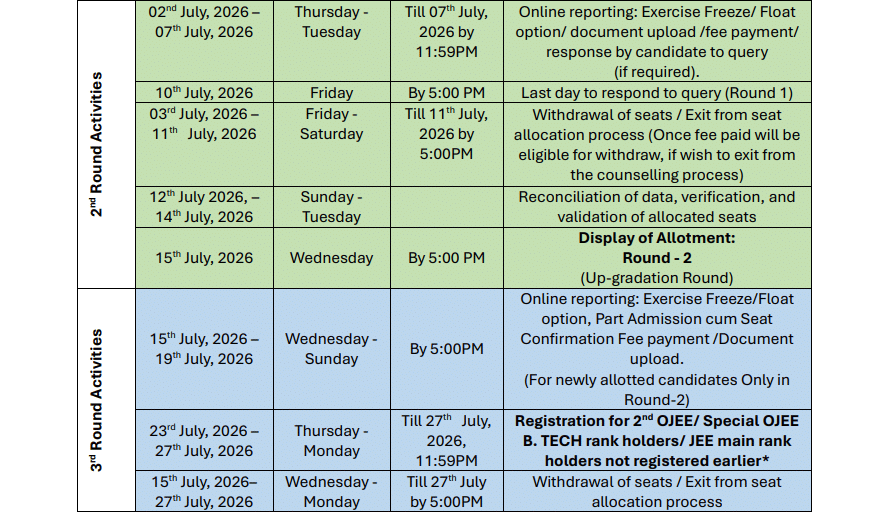
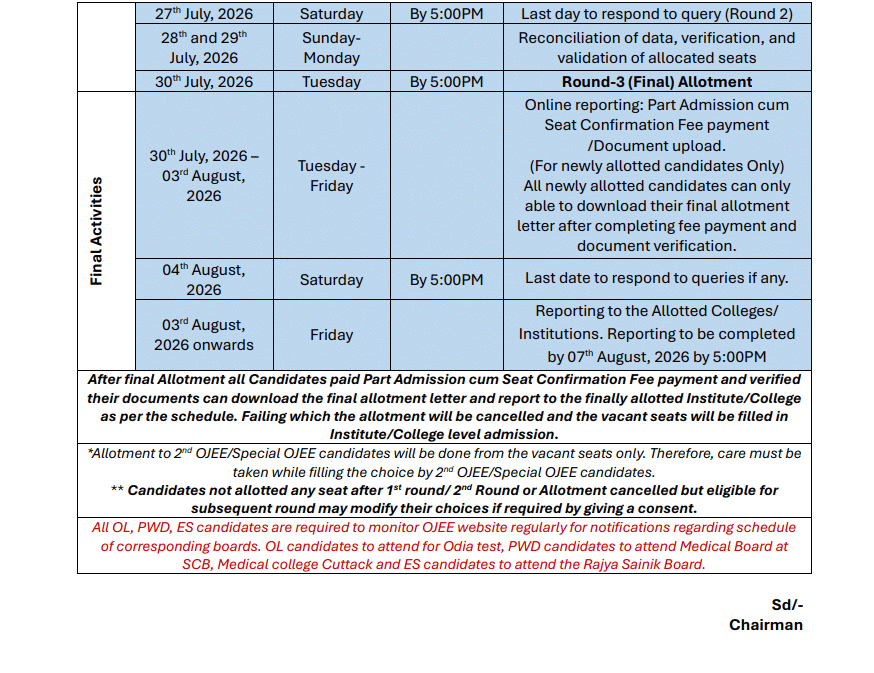
The OJEE Committee has released the tentative 2026 counselling schedule for UG courses including B.Tech, B.Arch, B.Plan, B.CAT and Integrated M.Sc. Candidates can download the brochure and schedule on the official OJEE website.
The Odisha Joint Entrance Examination Committee (OJEEC) has released the tentative 2026 counselling schedule for undergraduate (UG) courses on the official website at odishajee.com. The notice was uploaded on June 16, 2026, alongside the official Counselling Brochure and a step-by-step procedure document for web-based counselling.
The schedule covers admissions into B.Tech, B.Arch, B.Plan, B.CAT and Integrated M.Sc. programmes. Registration, choice filling and seat allotment rounds will be conducted fully online through the OJEE counselling portal. Candidates must use their JEE (Main) 2026 or OJEE 2026 rank, depending on the course they are applying for.
The OJEEC has also released the Counselling Brochure OJEE 2026 and the step-by-step procedure document. Candidates are advised to read both files carefully before starting the registration process.
Also Check: Special OJEE 2026 Registration Open at ojee.nic.in
Courses Covered Under OJEE 2026 Counselling
The OJEEC will conduct admission counselling for the following UG programmes through the 2026 cycle:
- B.Tech and B.Tech Lateral Entry
- B.Arch and B.Plan
- B.CAT (Bachelor in Computer Application and Technology)
- Integrated M.Sc.
- B.Pharm and B.Pharm Lateral Entry
- Basic B.Sc. Nursing
- Post Basic B.Sc. Nursing and Post Basic Diploma Nursing
Admission to MBBS, BDS, BAMS and BHMS will be processed separately. These medical seats are filled on the basis of NEET (UG) 2026 ranks of Odisha state candidates.
OJEE 2026 Counselling Key Details
| Particulars | Details |
| Conducting Body | Odisha Joint Entrance Examination Committee (OJEEC) |
| Official Portal | odishajee.com / ojee.nic.in |
| Schedule Released On | June 16, 2026 |
| Mode of Counselling | Fully online (web-based) |
| Selection Basis | JEE (Main) 2026 or OJEE 2026 rank |
| Courses Covered | B.Tech, B.Arch, B.Plan, B.CAT, Int. M.Sc., B.Pharm, Nursing |
How to Register for OJEE 2026 Counselling?
Candidates must complete registration on the official counselling portal. The OJEEC has released a dedicated step-by-step procedure document for web-based counselling. The process involves the following stages:
- Visit the official portal at odishajee.com.
- Click on the OJEE 2026 counselling registration link.
- Enter your application number and rank details.
- Fill in personal, academic and category information.
- Upload the required documents in the prescribed format.
- Pay the counselling registration fee online.
- Lock your choices of college and branch in the choice-filling window.
- Download the filled-in confirmation page for future reference.
Also Check: CUET UG 2026 Result Soon- Check Live Updates
Documents Required for OJEE 2026 Counselling
Candidates should keep both original and scanned copies of the following documents ready before starting registration:
- OJEE 2026 or JEE (Main) 2026 rank card
- Class 10 and Class 12 mark sheets and certificates
- Nativity / domicile certificate of Odisha
- Category certificate (SC, ST, SEBC, EWS, PwD) if applicable
- Aadhaar card or any government photo ID
- Recent passport-size photograph and signature
OJEE counselling is the single window for nearly all professional UG seats in Odisha. Engineering, pharmacy and nursing seats are filled through this cycle. Missing the registration window can mean losing a year of admission.
Action Plan for Candidates
- Download the OJEE 2026 Counselling Brochure from the official site.
- Read the step-by-step procedure document in full.
- Keep your JEE Main or OJEE 2026 rank card ready.
- Arrange all academic and category documents in scanned format.
- Register on the portal as soon as the window opens.
- Fill and lock choices carefully before the deadline.
Watch for the final registration window dates and the first round seat allotment notice on odishajee.com in the coming days.
Also Check:
.jpeg?h=127&w=254&mode=stretch)


.jpeg?h=127&w=254&mode=stretch)










Comments