



Content Writer | Updated On - May 15, 2026
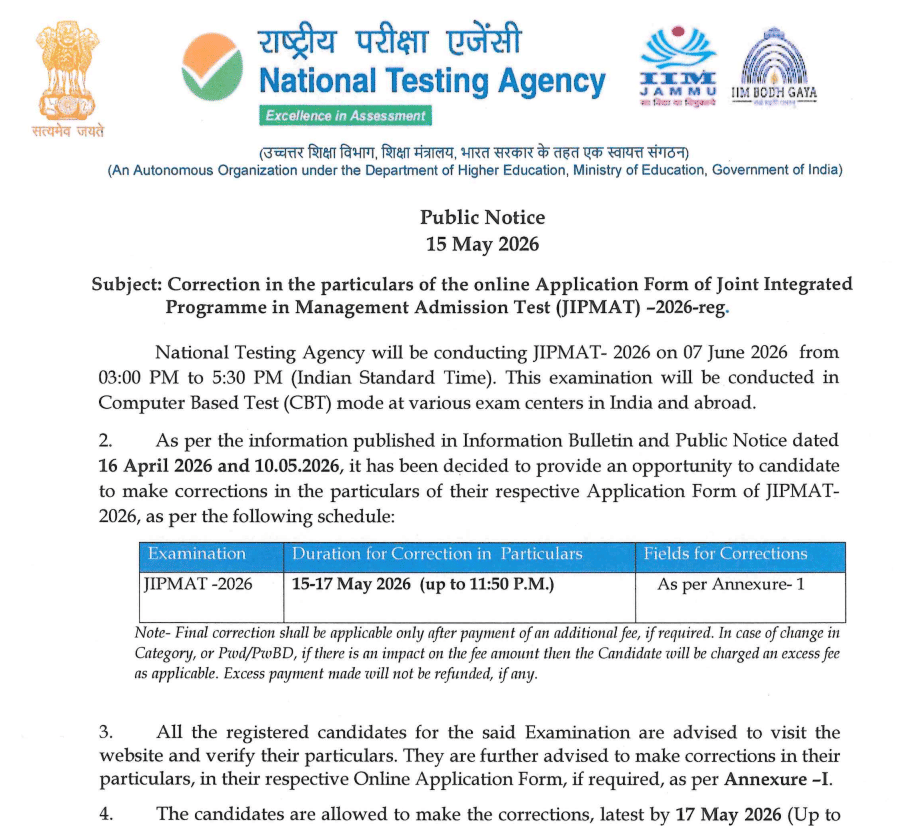
JIPMAT 2026 correction window open till May 17, 2026 (11:50 PM). Candidates can correct application details at nta.ac.in. Exam on June 7, 2026 (3 PM to 5:30 PM). Additional fee applicable if category/PWD changes.

The National Testing Agency (NTA) has opened a correction window for JIPMAT 2026 candidates. If you've registered for the Joint Integrated Programme in Management Admission Test, you can now make corrections to your application form. The correction window is open from May 15 to May 17, 2026 up to 11:50 PM. This is a one-time facility, so make sure to correct all details carefully as no further corrections will be allowed after the deadline.
The JIPMAT 2026 exam is scheduled for June 7, 2026 from 3:00 PM to 5:30 PM (IST). The exam will be conducted in Computer Based Test (CBT) mode at various exam centers across India and abroad. This is your last chance to ensure all your application details are accurate before the exam.
| Direct Link: Check Out Complete Notification Here |
Read More: AUEET 2026 Result Out; Download Rank Card
Correction Window Details
| Information | Details |
| Correction Window Opens | May 15, 2026 |
| Correction Window Closes | May 17, 2026 (11:50 PM) |
| JIPMAT 2026 Exam Date | June 7, 2026 |
| Exam Time | 3:00 PM to 5:30 PM (IST) |
| Exam Mode | Computer Based Test (CBT) |
| Portal | nta.ac.in / exams.nta.nic.in/jipmat |
What You Can Correct?
According to the official notice, you can make corrections in specific fields of your application form. The exact list of correctable fields is provided in Annexure-1 of the notice. Common corrections include personal details, educational qualifications, category information, PWD/PwBD status, and exam center preferences. Visit the official portal to see the complete list of fields you can modify.
Read More: NTA Announces Re-NEET Exam 2026 Date; Check Schedule Here
Important Points to Remember
If you change your category or PWD/PwBD status and it impacts the fee amount, you'll need to pay an additional fee. This excess fee is non-refundable. Payment can be made through credit card, debit card, net banking, or UPI. Make sure to verify all your details carefully before making corrections as this is a one-time facility. After May 17 at 11:50 PM, no corrections will be entertained under any circumstances.
How to Make Corrections?
Visit nta.ac.in or exams.nta.nic.in/jipmat and log in with your credentials. Navigate to the correction window section. Review all your application details carefully. Identify the fields that need correction. Make the necessary changes in the allowed fields. If additional fee is applicable, pay it through your preferred payment mode. Submit your corrections before the deadline. Save the confirmation for your records.
Why Does This Matters?
Accurate application details are crucial for your exam. Any discrepancies between your application form and identity proof at the exam center can cause issues. The correction window gives you a final opportunity to ensure everything is correct. Don't miss this one-time facility as no corrections will be allowed after May 17.
Conclusion
JIPMAT 2026 correction window is open till May 17, 2026 (11:50 PM). This is your last chance to correct any errors in your application form. Visit nta.ac.in immediately and verify all your details. Make necessary corrections carefully as no further changes will be allowed. Pay any additional fees if applicable. The exam is on June 7, 2026. Don't miss this one-time opportunity to ensure your application is accurate.
Also Read:
- JEST Result 2026 Out; Download Scorecard Now
- IISc Bangalore Cutoffs 2026-27 Out; Download GATE, CAT, CEED Cutoffs
- Dibrugarh University B.Tech/M.Tech Admissions 2026 Open; Apply by June 30
- Nagaland B.Ed CET 2026 Registrations Open Till May 25; Entrance Exam July 11
Subscribe to Collegedunia to get the latest news and updates –
.jpeg?h=127&w=254&mode=stretch)




.jpeg?h=127&w=254&mode=stretch)


.jpeg?h=127&w=254&mode=stretch)


.jpeg?h=40&w=40&mode=stretch)

.jpeg?h=40&w=40&mode=stretch)

.jpeg?h=40&w=40&mode=stretch)


.jpeg?h=40&w=40&mode=stretch)





Comments