




AP PGECET applications are accepted online only, with fee payment, form filling, and submission completed through the portal. Candidates need to pay their application fee first, as they can access the application form only after paying the fee. They should check payment status using the qualifying exam Hall Ticket Number and mobile number before proceeding.
The application form is accessed using the Payment Reference ID, Hall Ticket Number, mobile number, and DOB. Then they need to fill in the details and upload their photograph and signature.
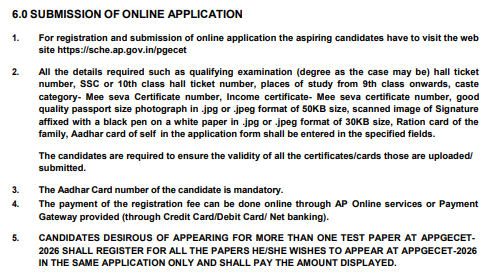
- The photograph must be JPG/JPEG and under 50 KB, with a clear formal appearance and light background.
- The signature must be JPG/JPEG and under 30 KB, preferably scanned clearly from plain white paper.
- Candidates must enter personal, contact, academic, reservation and certificate details accurately from their official documents.
- After submission, candidates should print the application form using their Registration Number, Payment ID, Hall Ticket Number and mobile number. After the application deadline passes, a correction window opens.
- Category 1 details cannot be edited online, including name, father's name, DOB, signature, photograph, qualifying Hall Ticket Number and test paper.
- Category 2 details can be corrected online, including gender, Aadhaar, academic details, local area, reservation, income, contact and special-category details.
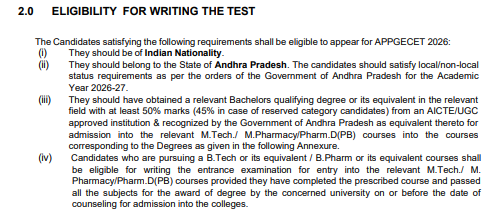
- Final-year candidates can apply, but must pass the qualifying course and produce a provisional certificate during counselling.
Related Links:
- AP PGECET Eligibility Criteria 2027: Qualification, Marks, Age Limit & Documents Required
- AP PGECET Form Correction 2027: Expected March 2027, Editable Fields and No Correction Fee
- AP PGECET Registration 2026 (Ongoing)- Check How to Apply, Fees, Correction Window at cets.apsche.ap.gov.in
Key Summary
- AP PGECET Application Process 2027 has six steps, starting with fee payment and ending with printing the submitted application form.
- AP PGECET Application Fee: ₹1,200 (OC), ₹900 (BC) and ₹700 (SC/ST/PH), per exam paper.
- AP PGECET last date to apply is expected in the third week of March 2027, without late fee.
- AP PGECET photo and signature: photograph under 50 KB and signature under 30 KB, both in JPG/JPEG format.
- AP PGECET Application Form Correction 2027: a short window of about 3 to 4 days in early April 2027, split into online-editable and email-only fields.
AP PGECET Application Process 2027: Overview
The AP PGECET is a state-level entrance exam conducted for admission into postgraduate engineering and pharmacy courses across Andhra Pradesh.
- Conducting Body: APSCHE, usually managed through a state university such as Andhra University.
- Courses Covered: M.E., M.Tech., M.Pharm. and Pharm.D (Post Baccalaureate).
- Online Application Only: The AP PGECET Apply Online process has no offline mode, so registration, form filling, and payment all happen on the portal.
| Particulars | Details |
|---|---|
| Exam Name | Andhra Pradesh Post Graduate Engineering Common Entrance Test (AP PGECET) |
| Conducting Authority | Andhra Pradesh State Council of Higher Education (APSCHE), usually managed by a state university on its behalf |
| Purpose | State-level entrance exam for admission into M.E., M.Tech., M.Pharm. and Pharm.D (Post Baccalaureate) |
| Participating Institutes | Over 300+ constituent and affiliated colleges (government and private) across Andhra Pradesh |
| Application Mode | Online only |
| Expected Application Start | First week of February 2027 |
| Expected Last Date to Apply | Third week of March 2027 (without late fee) |
| Application Correction | A brief 48-hour online correction window, typically in the last week of March 2027 |
| Application Fee |
|
| Expected Admit Card | Mid-April 2027 |
| Expected Exam Date | Last week of April 2027 |
| Exam Mode | Computer-Based Test (CBT), online |
| Subjects Available | 13 discipline-specific test papers
|
| Official Website | APSCHE CET Portal |
Source: AP PGECET instruction Booklet 2026
Students on Quora ask this general query about the website on which students can apply for the AP PGECET exam:
- The answer is that the official website to apply for the AP PGECET exam is cets.apsche.ap.gov.in/PGECET.
- Students need to pay an upfront application fee before filling the application form for AP PGECET.

Source: Quora
Ques. How to apply for AP PGECET 2027?
Ans. Pay the application fee first, check the payment status, fill the application form using the Payment Reference ID, upload the photo and signature, preview and submit, and finally print the application form. This is the full AP PGECET Application Process explained step by step below.
Ques. What is the AP PGECET official website?
Ans. The AP PGECET application form is available only on the official APSCHE CET portal, where fee payment, registration, form filling and correction all take place.
Also Read:
AP PGECET Application Process 2027: Step-by-Step Guide
The AP PGECET 2027 online application process has a distinct order as follows:
- Students need to pay the fees before they fill out the form.
- Using the payment reference ID, students can log in to the application portal and fill out their application form.
| Step | Application Stage | What to Do |
|---|---|---|
| 1 | Fee Payment |
|
| 2 | Check Payment Status |
|
| 3 | Fill Application Form |
|
| 4 | Upload Photo and Signature |
|
| 5 | Preview and Submit |
|
| 6 | Print Application Form |
|
This video by the channel “Degree Baadhithulu” discusses the AP PGECET official registration website, how new candidate registration is done, how to create registration/login credentials, along with the registration process step by step to help students fill the AP PGECET Application Form.
Ques. How to fill AP PGECET form?
Ans. Steps to fill the AP PGECET application form 2027 begin with fee payment, not registration. Only after the fee is paid can a candidate access the application form using the Payment Reference ID, Hall Ticket Number, mobile number and DOB.
Also Read:
AP PGECET Application Fee 2027
The AP PGECET Application Fee structure for 2027 has not been officially announced. The figures below are based on the 2026 fee structure.
- Category-wise Fee
- OC candidates pay ₹1,200,
- BC candidates pay ₹900, and
- SC/ST/PH candidates pay ₹700 per exam paper.
- Payment Modes: Credit Card, Debit Card, or Net Banking, strictly online.
- Late Fee: Candidates who miss the initial deadline can still submit the form with a late fee, which in the previous cycle ranged from ₹1,000 to ₹10,000 depending on how late the form was submitted.
| Category | Application Fee |
|---|---|
| OC (General) | ₹1,200 |
| Backward Classes BC | ₹900 |
| SC / ST / PH(PwD) | ₹700 |
Ques. What is the AP PGECET application fee?
Ans. It is ₹1,200 for OC, ₹900 for BC and ₹700 for SC/ST/PH candidates, per exam paper, expected to remain similar to the previous cycle.
Ques. What is the AP PGECET last date to apply?
Ans. The AP PGECET application form last date is expected to fall in the third or fourth week of March 2027, without late fee. Late submissions are accepted afterward with an additional fee.
Also Read:
Also Read:
Documents Required for the AP PGECET Application Process 2027
The AP PGECET 2027 documents required for application cover two uploadable files and several certificates needed for data entry, not upload.
- Across the list of documents mentioned below, only the photograph and signature are required to be uploaded on the portal; the rest of the fields are to be manually filled as required.
| Document / Certificate | Key Details |
|---|---|
| Passport Size Photograph | Coloured photo, light background; JPG/JPEG, under 50 KB |
| Signature | Black/blue ink on white paperJPG/JPEG, under 30 KB |
| Qualifying Degree Certificate | B.E./B.Tech/B.Pharm degree or provisional certificate |
| Class 10th (SSC) Hall Ticket and Marks Memo | Keep hall ticket number and marks details ready |
| Class 12th (Intermediate) Hall Ticket and Marks Memo | Keep hall ticket number and marks details ready |
| Qualifying Exam Hall Ticket | Keep hall ticket number ready |
| Study Certificates | Class 6 to Intermediate/Diploma and Degree; relevant for OU/AU/SVU areas |
| Residence Certificate | Required for candidates with no institutionalised education |
| Aadhaar Card | Mandatory for identity verification |
Category-specific documents to be uploaded:
| Category or Disability Certificate | Certificate Required for |
|---|---|
| Community/Caste Certificate | For BC/SC/ST candidates, issued via Meeseva |
| Income Certificate | Latest certificate issued by MRO/Tahsildar |
| EWS Certificate | Required for eligible General category EWS candidates |
| Special Category Certificate | NCC, CAP, Sports or PwD certificate, if applicable |
Ques. What documents are needed for AP PGECET application?
Ans. A photograph and signature must be uploaded. Degree, SSC and Intermediate hall tickets, study certificates, caste, income, EWS and special category certificates, and an Aadhaar card are needed for data entry and later verification.
Also Read:
- AP PGECET 2026 Food Technology Question Paper: Download Answer Key with Solutions
- AP PGECET 2026 Electrical Engineering Question Paper: Download Answer Key with Solutions
- AP PGECET 2026 Mechanical Engineering Question Paper: Download Answer Key with Solutions
AP PGECET Photo and Signature Upload Specifications 2027
The AP PGECET 2027 photo and signature specifications are strict, and incorrect sizes or illegible scans can lead to rejection.
- Do Not Swap Files: Upload the photograph into the photo box and the signature into the signature box.
- Name, category, photograph, and signature cannot be edited online once the form is submitted, even during the correction window.
Passport Size Photograph Guidelines
| Parameter | Requirement |
|---|---|
| File Format | .jpg or .jpeg only |
| File Size | Under 50 KB; ideally 10–50 KB |
| Background | Plain white/light-coloured, without patterns or shadows |
| Appearance | Full face and shoulders visible, looking straight at the camera |
| Accessories | Avoid caps, hats, hoods and dark sunglasses; spectacles should not cause glare |
| Photo Type | Formal passport-size photograph; avoid selfies or filtered photos |
Signature Upload Guidelines
| Parameter | Requirement |
|---|---|
| File Format | .jpg or .jpeg only |
| File Size | Under 30 KB; ideally 5–30 KB |
| Ink Type | Black ink pen; avoid light ink and smudging |
| Paper | Clean, unruled plain white paper |
| Dimensions | Preferred approximately 140 × 60 pixels |
| Cropping | Crop tightly so the handwriting is clearly visible |
| Authenticity | Signature must be the candidate's own and clearly legible |
Ques. What is the AP PGECET photo and signature upload size?
Ans. The photograph must be under 50 KB and the signature under 30 KB, both in JPG or JPEG format, uploaded in their correct respective boxes.
Details Required in the AP PGECET Application Form 2027
Below are the details to be submitted in the AP PGECET Application Form:
- Enter personal, academic, reservation and certificate details exactly as mentioned in the respective official documents to avoid discrepancies.
- Verify the AP PGECET test paper and select the preferred primary and secondary test centres before submitting the application.
| Category | Details to Enter |
|---|---|
| Personal and Identity Details | Name, father's and mother's name, date of birth, gender, Aadhaar number, birth state and birth district |
| Contact and Address Details | Mobile number, alternate mobile number, email ID, permanent address and correspondence address |
| Academic and Reservation Details | Qualifying degree, specialisation, hall ticket number, percentage/CGPA, Class 10th and 12th details, place of study, category/caste, caste certificate, EWS, income certificate and special reservation details |
| Exam-Specific Choices | AP PGECET test paper, and primary and secondary test centre preferences |
Ques. AP PGECET application form mein kya details bharni hain?
Ans. Personal and identity details, contact and address details, academic and reservation details, and exam-specific choices such as the test paper and centre preferences.
AP PGECET Application Form Correction 2027
APSCHE provides a dedicated correction window of about 3 to 4 days, typically in early April 2027. Corrections fall into two categories:
- Fields that need email approval from the Convener (Category 1)
- Fields that can be edited directly online (Category 2)
Category 1 (Email Only):
- Category 1 is the category used by APSCHE to designate fields that are completely locked and uneditable by the candidate online.
- Name, father's name, date of birth, signature, photograph, qualifying hall ticket number, and the AP PGECET test paper require an email request with a supporting document.
Category 2 (Online Editable):
- Gender, Aadhaar number, academic details, local area status, reservation category, income certificate details, mother's name, mobile number, email ID and address can be corrected directly on the portal.
Category 1: Details That Cannot Be Edited Online
| Field | Supporting Document |
|---|---|
| Candidate's Name | SSC Marksheet/Memo |
| Father's Name | SSC Marksheet/Memo |
| Date of Birth | SSC Marksheet/Memo |
| Signature | Correct scanned signature |
| Photograph | Correct passport-size photograph |
| Qualifying Hall Ticket Number | Degree provisional certificate/marksheet |
| AP PGECET Test Paper | Qualifying exam hall ticket |
Category 2: Details That Can Be Edited Online
- Gender and Aadhaar Number: Updated directly through the portal during the correction window.
- Academic Details: Qualifying degree passing year, graduation place, study certificates and schooling details.
- Local Area and Reservation Details: AU/SVU/OU local area status, caste/community category and EWS status.
- Certificate and Contact Details: Income certificate, fee reimbursement status, mother's name, mobile number, email ID and communication address.
- Special Category Details: NCC, Sports, CAP and PwD reservation details.
How to Make Category 2 Corrections Online
- Visit the official AP PGECET website.
- Click "Online Application Correction" (active only during the designated window).
- Log in using the Payment Reference ID, Registration Number, Qualifying Exam Hall Ticket Number, mobile number and DOB.
- Modify the permitted fields, preview the changes, and click Submit/Save.
- Print a fresh copy of the updated application form for records.
Ques. What if my AP PGECET registration login problem persists during correction?
Ans. Re-check the Payment Reference ID, Registration Number, Hall Ticket Number, mobile number and DOB entered at login, since a mismatch in any one of these is the most common reason login fails.
Who Can Apply for AP PGECET 2027?
Indian nationals residing in Andhra Pradesh or Telangana who meet the academic benchmarks can apply for AP PGECET 2027.
- Ensure your qualifying degree, minimum marks, category, and PCI approval requirements match the programme you are applying for.
- Final-year students must produce the provisional certificate during counselling, while unapproved distance degrees are not eligible.
| Eligibility Category | Requirement |
|---|---|
| Domicile / Local Status |
|
| M.Tech / M.E. |
|
| M.Pharmacy |
|
| Pharm.D (Post Baccalaureate) |
|
| Final-Year Candidates |
|
| Distance Education |
|
| GATE/GPAT Candidates |
|
Source: AP PGECET instruction Booklet 2026
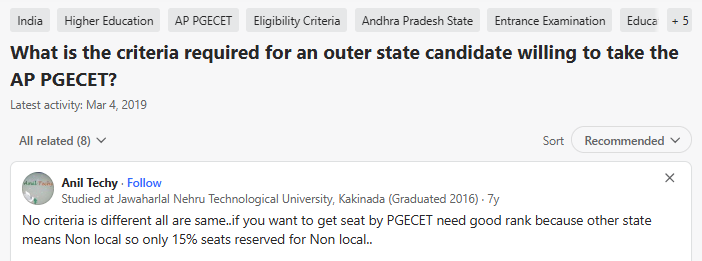
Students on Quora ask about the criteria for out-of-state applicants to apply for AP PGECET exam:
- The academic qualifications required for out-of-state candidates are identical to local candidates.
- 15% Non-Local Quota: Candidates from outside Andhra Pradesh are classified as non-local and are eligible to compete under the 15% unreserved/non-local seat quota, requiring a higher rank to secure admission.
Source: Quora
Registration Trends for the AP PGECET Application Process
Recent AP PGECET registration trends show a high overall pass percentage alongside branch- and gender-wise variation.
- Computer Science Engineering: Out of 3,047 candidates who appeared, 2,977 qualified, a 97.70% pass rate, the highest among branches.
- Pharmacy (M.Pharm): Recorded the second-highest participation, with 3,770 candidates appearing for the exam.
- Gender-wise Trend: 5,526 female candidates appeared with 5,176 qualifying (93.67%), while 4,464 male candidates appeared with 4,144 qualifying (92.83%).
| Parameter | 2026 Cycle | 2025 Cycle |
|---|---|---|
| Total Registered Candidates | 12,102 | 14,231 |
| Total Candidates Appeared | 9,990 | ~12,000 |
| Total Candidates Qualified | 9,320 | 11,244 |
| Overall Pass Percentage | 93.29% | 93.55% |
AP PGECET Application Form Mistakes to Avoid
Follow the tips below while filling the application form to avoid mistakes:
- Match your personal, local-area, income, and test-paper details with the relevant certificates before submission.
- Ensure the photo/signature meet size requirements and use Save & Preview to catch any errors in the final form.
| Mistake | Possible Error Points | How to Avoid It |
|---|---|---|
| Incorrect Category 1 Details | Name, DOB or qualifying hall ticket number errors cannot be corrected online easily | Match details exactly with your SSC memo and academic certificates before submission |
| Incorrect / Low-Quality Images | Blurry or swapped photograph/signature may cause verification issues | Upload clear images in the prescribed format and size: photo under 50 KB, signature under 30 KB |
| Wrong Local Area Selection | Incorrect AU/SVU/OU status can affect eligibility for local-area seats | Verify Class 6 to Graduation study certificates before selecting the local area |
| Incorrect Income Details | Wrong income category or certificate number can affect fee reimbursement claims | Enter details exactly as mentioned on the valid income certificate |
| Wrong Test Paper Selection | Choosing an unsuitable paper may create eligibility issues during counselling | Check the official eligibility/mapping requirements before selecting the test paper |
| Submitting Without Review | Errors may remain in the final application | Use Save and Preview, and verify every detail before final submission |
Ques. Why is my AP PGECET application form rejected?
Ans. Common reasons include mismatched name or DOB, incorrectly sized or swapped photo/signature files, wrong local area selection, or submitting without reviewing the preview page.
Ques. AP PGECET form payment failed, what to do?
Ans. Check the payment status using "Know Your Payment Status" with the qualifying exam Hall Ticket Number and mobile number. If the amount was deducted but the status shows failed, wait for the bank's refund cycle before attempting payment again, and contact APSCHE support if it isn't resolved.
What to Do After Completing the AP PGECET Application Process 2027
Follow the steps below after completing the AP PGECET Application Process 2027:
- Print the Application Form: Download and print at least two physical copies. Verify that a Registration Number appears at the top of the page.
- Save the Payment Receipt: Keep a digital copy of the fee transaction receipt showing "Success" status and the Payment Reference ID.
- Update Category Certificates: Ensure the Caste Certificate and Income Certificate are valid and updated through Meeseva for the 2027 financial year.
- Collect Study Certificates Early: Gather Study Certificates from Class 6 onwards from the respective institutions to confirm local status (AU/SVU/OU), since a mismatch later can affect seat allocation.
AP PGECET Application Process FAQs
Ques. What is the AP PGECET application process 2027?
Ans. The AP PGECET Application Process 2027 has six steps: fee payment, checking payment status, filling the application form, uploading photo and signature, preview and submission, and printing the form. The fee ranges from ₹700 to ₹1,200 by category.
Ques. How to check AP PGECET application status?
Ans. Use the "Know Your Payment Status" option with the qualifying exam Hall Ticket Number and mobile number to confirm the fee payment, and the "Print Application Form" option with the Registration Number, Payment ID, Hall Ticket Number and mobile number to confirm the form has been submitted.
Ques. Where do I find the AP PGECET application form link?
Ans. The application form is accessible only through the official APSCHE CET portal, and only after the application fee has been paid.
Ques. Is offline application allowed for AP PGECET?
Ans. No. The AP PGECET Application Process is entirely online, from fee payment to form printing.



Comments