


To raise an objection to the AIBE 21 answer key, you need to visit the official website www.allindiabarexamination.com/. Log in to your candidate account using your Login ID and Password.
- Click on “Raise Objection” and provide all the details and attach the evidence for the objection claim for 1 question or more questions and pay a 500 fee per objection.
- Before raising an objection, make sure you have strong evidence to prove your objection claim.
- The fee for raising an objection against the AIBE 21 answer key is ₹500 for each question. However, the fee will be refunded if the claim is accepted.
- Candidates can raise objection claim for AIBE 21 answer key once the provisional answer key is released. Answer key is expected to be released within 2nd week of June 2026.
Also Read:
- Check Expected AIBE 21 Results and Scorecard
- Check AIBE 21 Category-wise Cutoff and Qualifying Marks
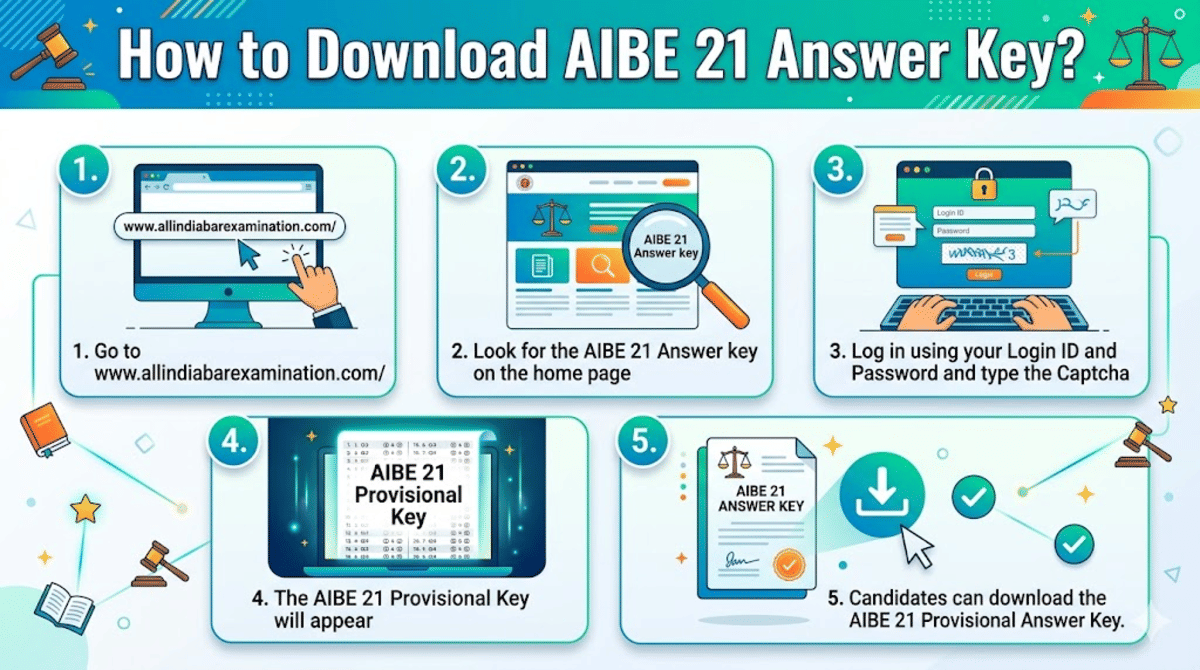
How to Download AIBE 21 Provisional Answer Key 2026 to Raise Objection
Once the AIBE 21 provision answer key 2026 is released and you find any discrepancies in the answer key, you can raise an objection on the official portal.
- First, go to www.allindiabarexamination.com/
- Look for the AIBE 21 Answer key on the home page
- Log in using your Login ID and Password and type the captcha
- The AIBE 21 Provisional Key will appear
- Candidates can download the AIBE 21 Provisional Answer Key.
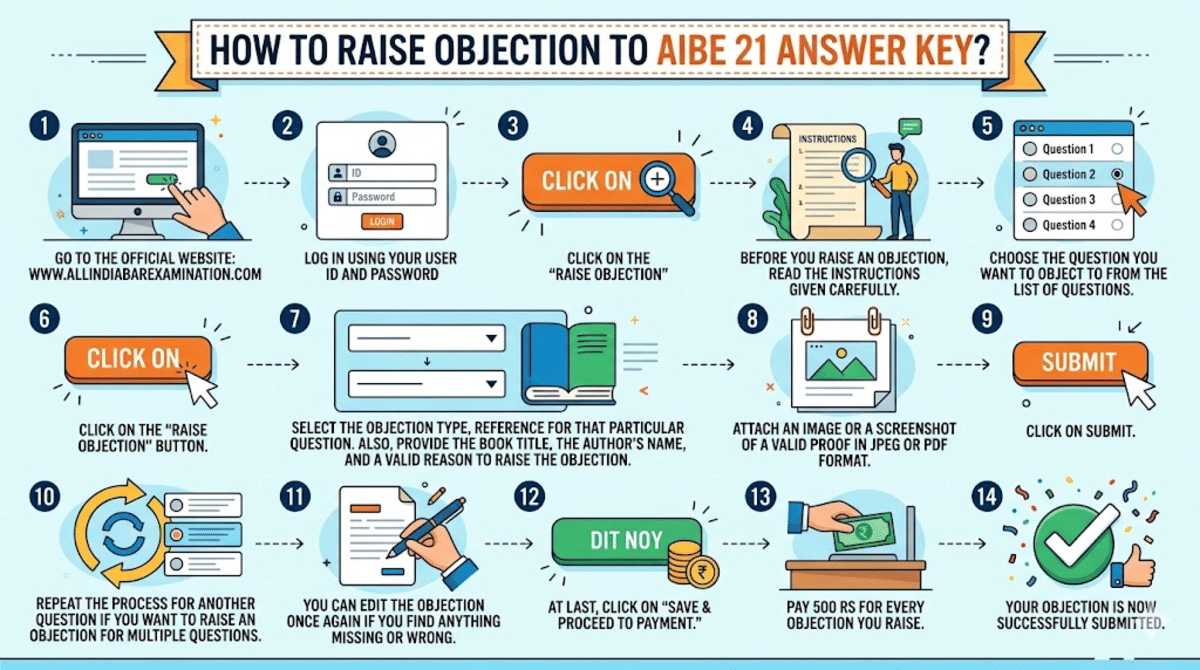
How to Raise an Objection for AIBE 21 Answer Key?
Objecting to the AIBE provisional answer key is a very easy and straightforward process. However, before objecting to any particular question, make sure you have a valid proof such as the BARE Act references, standard books or judgments.
- Go to the official website www.allindiabarexamination.com/
- Log in using your User ID and password
- Click on the “Raise Objection”
- Before you raise an objection, read the instructions given carefully.
- Choose the question you want to object to from the list of questions.
- Click on the “Raise Objection” button.
- Select the objection type, reference for that particular question. Also, provide the book title, the author's name, and a valid reason to raise the objection.
- Attach an image or a screenshot of a valid proof in JPEG or PDF format.
- Click on Submit.
- Repeat the process for another question if you want to raise an objection for multiple questions.
- You can edit the objection once again if you find anything missing or wrong.
- At last, click on “Save & Proceed to Payment.”
- Pay 500 Rs for every objection you raise.
- Your objection is now successfully submitted.
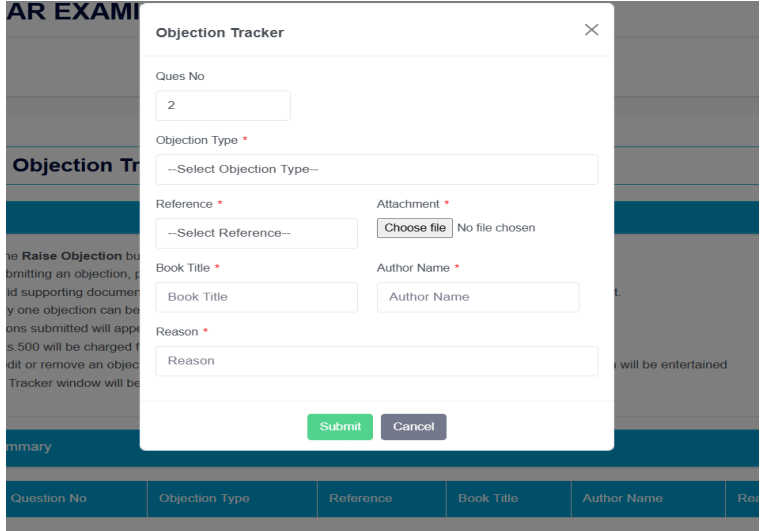
Source: Official AIBE Objection Tracker Guide
Ques. What kind of proof do I need to upload for objection? Will a screenshot work?
Ans. Strong evidence like scanned Bare Act pages, standard textbooks, or Supreme Court judgments. Screenshots of coaching keys are usually not accepted.
Ques. After I raise an objection on AIBE 21, how long until I know if it's accepted?
Ans. BCI reviews all objections and releases the final answer key. This usually takes a few weeks. Results follow shortly after. You will most likely not be notified individually.
What are the Documents Required to Challenge the AIBE 21 Answer Key?
Before you raise an objection to any question of the AIBE 21 answer key, make sure you have strong evidence to back that objection. Only genuine, strong evidence-based objections will be considered.
You must have any of these documents to upload while objecting to the AIBE 21 answer key.
- Official Bare Acts: Pages from any standard publications clearly showing section number, text and amendments.
- Supreme Court Judgements: Specific citations from reports like SCC, AIR or SCR, which consist of the proof for your objection claim.
- Standard Law Textbooks: Exact page or paragraph of a standard law textbook that has proof for your objection claim. You should also mention the textbook name and the author’s name while raising your objection.
| Document Category | Prescribed Format |
|---|---|
| Bare Act Excerpt | PDF/JPEG Image |
| Apex Court Ruling | PDF Document |
| Textbook Reference Page | JPEG |
Ques. Is it worth paying the fee? Many say BCI doesn't accept most objections.
Ans. File only strong, genuine cases. BCI has accepted valid objections in the past, leading to deletions or corrections.
Common Mistakes to Avoid While Raising Objections to AIBE 21 Answer Key?
Raising an objection without any error is most important while objecting to the AIBE 21 answer key. Many students make these common mistakes, such as,
- Submitting the objection without proper proof
- Using unofficial sources instead of the standard and official references
- Missing the objection deadline
- Raising the objection but forgot to pay the fee
- Raising objections just because of your personal doubt.
| Common Mistakes | How to Avoid it? |
|---|---|
| Objecting without valid proof | Only object if you have a valid proof with solid documents to prove your objection |
| Attaching unofficial sources like coaching centres' notes | Only use official Bare Acts, court rulings, or standard textbook images and PDF documents |
| Missing the objection deadline | The AIBE answer key objection window opens only for 5-7 days from the provisional key release. Make sure to raise an objection very early. |
| Raising an objection but forgot to pay the fee | After you raise objections to as many questions as you want, don’t forget to pay the fee. Without the fee, your objections will not be considered. |
Ques. Can I raise multiple objections in one go for AIBE 21?
Ans. Yes, you can challenge several questions with valid proof. However, you have to pay for each objection you claim.
How to Raise Objection AIBE 21 Answer Key?: Reddit Discussion
A user on Quora asked what they should do if they find any discrepancies in the AIBE provisional answer key. Candidates can object to the provisional answer key through the official AIBE website within the objection window.
Candidates should follow the steps above in the article to raise an objection against the AIBE 21 provisional answer key.



Comments